Having never heard of this before, it came as a shock. Its so simple that seems almost like a trick but its really not. I actually do like the question for that reason. Sometimes in the real world solutions are that simple as its a good trait to be able to recognize it. I answered the question well (or so I think), but I didnt pick up the simple refactor. If I was coding in front a computer I would have seen it in about 5 minutes but its different when you’re on a whiteboard in front of two senior architects. So heres the question:
Write a program that prints the numbers from 1 to 100. But for multiples of three print “Fizz†instead of the number and for the multiples of five print “Buzzâ€. For numbers which are multiples of both three and five print “FizzBuzzâ€.
So here’s what I came up with (in pseduo code):
for ( int i = 1 ; i <= 100; i ++ ) {

   if (i % 15 == 0 ) print "FizzBuzz";

   elseif (i % 3 == 0 ) print "Fizz";

   elseif (i % 5 == 0 ) print "Buzz";

   else print i;

}
So? Do you see it? Do you see the 'refactor' if it were (ignoring the ugly switch, design patterns, or thread safety for that matter)? Although the change is small change it does make a difference. Keep in mind this is pseudo code but they wanted me to see that if I cant print "Fizz" and "Buzz" in two separate 'if' blocks.
for ( int i = 1 ; i <= 100; i ++ ) {

   if (i % 3 == 0 ) print "Fizz";

   if (i % 5 == 0 ) print "Buzz";


   otherwise print i;

}
 This is now one of my favorite books on Java which I am probably going to read again just to be sure I have soaked up as much information as I can. This is a practical book written by a practical person who understands his audience, engineers. He is straight to the point with his code examples and doesnt bore you to death explaining every little detail or referencing lines of code and functions 8 pages back. I wish more technical writers would be this concise and straight to the point. There is something to be said for any technical writer who can get their message across with fewer words. No where else can I think of a better example of the old adage “less is more”. I would highly recommend this book to any engineer, especially associates.
Unfortunately for us we dont have a full time operations team at the moment. Its me really. The engineer, the frontend web developer, and admin. Im lucky that I saw it, put two-and-two together, and stopped it.
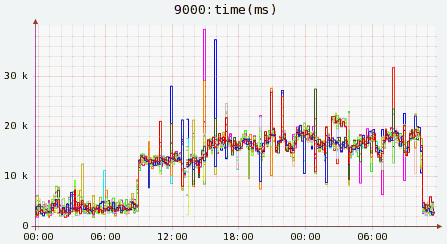
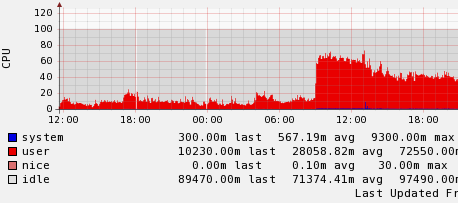
Anywho, this script kiddie managed to actually take down our appservers because our servlet container was only set to use 512 MB of RAM! This was not my doing although it has been operating fine for almost 2 years. Anyway, when we saw the increased spike in traffic we said great, maybe Googebot has come back around to save us from our perpetual Google dance. I noticed the increase in bot activity but thought nothing of it and went home. Little did I know it wasnt Googlebot.
The next day, i.e. today, I got into work to find our leads were still down but our page views were up. Thats odd? How and why could this be happening? I knew this wasnt people traffic because Google’s Urchin Tracker wasnt registering the requests because its Javascript (bots done fire it). It had to be a malicious user. I dug through yesterday’s logs and it turned out to be some script kiddie in Australia making about 25 requests per second from one IP address. What? No DDoS? Anyway, our machines performed well after more memory was allocated but they were thrashing a little.
Page load time
CPU load
After my discussion with Yonik Seeley, one of the Solr developers, I have to come to realize the way I was faceting was not correct. Although it worked, it did not work for speed and scalability. The proper way to query by facets is to use the ‘fq’ field as many times as needed. Each of these result sets is then cached, speeding up the next query as you add more facets. In line with the example I have been posting about, things have many tags, here is an example. When you run this query you will get anything with the phrase ‘stuff’ that is also tagged with ‘things’ and ‘junk’.
q=stuff&rows=10&facet=true&facet.field=tagsFaceted&fq=things&fq=junk
I learned this the hard way at work probably about 8 months back. Take a guess which of the two Google doesnt like and cant understand? Thats right, dont use underscores ‘_’ or camel case ‘camelCase’ in your URL’s! Although URL’s arent the most important part of your site but they definitely do have an impact. To Google, as dash represents a space and thats what you should live by.
Need proof? Notice anything different about the two result sets?
http://www.google.com/search?q=main+page
http://www.google.com/search?q=main_page
Thats right. They are two different entities. The underscore doesnt create a space and therefore is NOT stemmed. This is a problem inherent to MediaWiki (my favorite wiki). Although wiki’s werent made for this purpose they have surely evolved into something different. Actually, as I am writing this now I just got the thought to make an Apache rewrite proxy to change the underscores to dashes. If I get it to work I’ll post my findings.
Learn from my mistakes. If you have the chance to make a rewrite or better yet start from scratch use dashes.
When browsing the Gallery 2 installation on the A1 Imports Gallery I noticed that the default implementation was to use H2 as the headings! This is horrible, pointless, and not very well thought out. I realize that its not the job of the Gallery 2 engineers but they went far enough to make it an H2 so why not just make it an H1? Anyway the problem has been solved and we’ll see what type of results we get. Be sure to use them on your site, but use them wisely. A good rule of thumb is to only have one per page that is very specific to the content. Over-bloating your page with these tags will definitely send the wrong message to Googlebot.
I have had so many sites over the years and Im really sick of it! I finally have one site that I am happy with, serves its purpose, and is easily updatable. Although I am mostly a Java engineer, PHP is where I came from. There’s a right tool for ever job and this site is no exception. WordPress is a great little app and suits its job well. It even loosely follows a pseudo type of tiles MVC system.
Just in case I get bored of the look I can always modify the view via CSS. Although this site doesnt validate due to WordPress, its strict XHTML. Although tables are great for tabular data and I still believe in them this site is a table-less design.
In order to get the cleanest and best ranking possible, always redirect your subdomains (the ones not in use) to www! I cant stress this enough. When Google comes by and sees that http://site.com and http://www.site.com are the same it thinks that this is duplicate content, which it is! I just implemented this today for my friends site A1 Imports Autoworks. Go ahead, try it. Here is the rewrite for Apache:
RewriteCond %{HTTP_HOST} ^a1importsautoworks\.com(.*) [NC]
RewriteRule ^(.*) http://www.a1importsautoworks.com/$1 [L,R=301]
As well as using MooTools for validation, I am also using it for effects. Its nice to the the error boxes fade in and out. I think its just one of those touches that people appreciate (whether they really call it out or not). Anyway, MooTools makes it really easy as you can tell by this code.
function showErrorMessage() {
exampleFx = new Fx.Style(‘error-message’, ‘opacity’, {
duration: 500,
transition: Fx.Transitions.quartInOut
});
exampleFx.start(0,1); /*fade it in*/
}
Let me start by saying, I dont like Javascript but I love MooTools. Its not that I dont think Javascript is great and highly powerful, I just hate dealing with it especially when my job is the backend. I would do anything for a stacktrace like there is in Java!
Anywho, MooTools is a Javascript framework developed by a fellow coworker at CNET. Much like Prototype, Dojo, Scriptaculous and others it offers and extensible and extendable framework on which to build upon. I will cover more of my toilings when I have the time. I would highly recommend looking into it even if you have already used other frameworks. Here is a link to the MooTools site.