Archive for the ‘Computers’ Category

Stale cache serving strategy with reactive flush

This is a cache I have created that allows me to always serve the user cached data, i.e. never serving a miss. There are times when some data is just too complicated to make the user request thread wait and other times you just want to be sure you have high availability with no user facing recompute time at all. This is a great technique for template caches and API wrappers which I have employed more than once in my career.

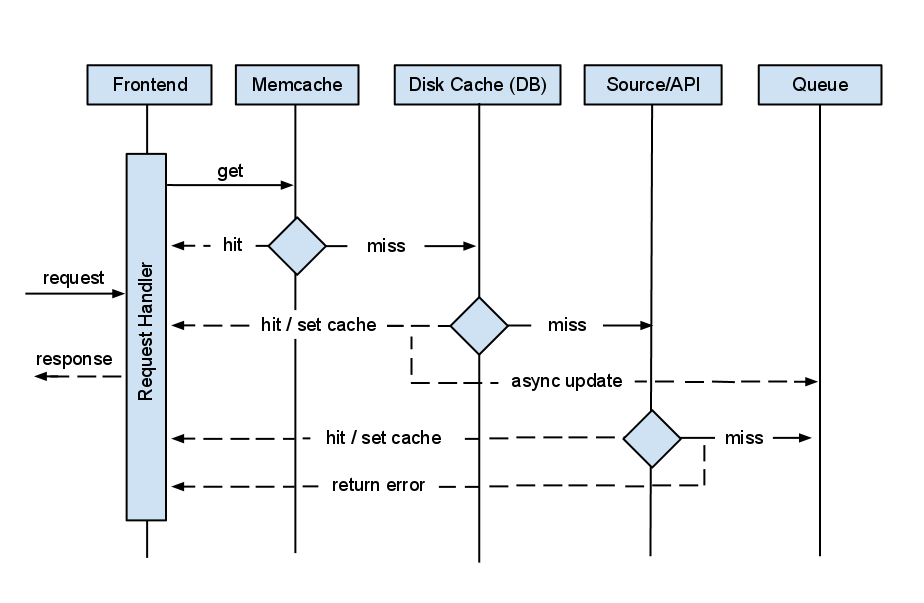
I achieve the goal of no cache misses by first building what I call a persistent cache; memcache backed by disk or database. This way if memcache ever takes a miss I look in the database and pull the result from there. I then recache that result in memcache for a short amount of time and return the response to the user. At the same time, I then put a task on my task queue (MQ) to go recalculate the data and then update my persistent cache. If all caches are empty then I hit the API and upon success, cache the results and return the data to the user. If the API throws an error I put a task on the queue and hopefully the next time the user requests that data the cache will be warmed upon a successful API query.

Essentially this creates a type of MRU cache, only using memcache for frequently used data. I could use cron or something like it but I like that my users and bots are the ones who flush my caches based on demand rather than time or some other indicator.

Stale cache serving strategy
(click diagram for a larger version)

The diagram above describes how I built the caching for Klout Widget, a hack I created just to demonstrate this strategy. Their API was a little finicky so I decided to create a persistent cache that would be resilient to bad or missing data. Go ahead, give it a try.

Anyway, hope this strategy is useful. If anyone knows the name for this type of cache I’m all ears. As far as I know its something I dreamed up.

Django template tags for SOLR queries

Yes, I know the idea is nuts but when you’re a fast moving bootstrapped startup sometimes you build things like this. That being said, you better have good business reasons for making something this hifalutin as there are many other ways to skin the cat.

The reason we opted to do this is to allow us to quickly and easily make SEO friendly pages without changing backend software. This is also built into our CMS so churning out data driven pages happens at the drop of a hat. Currently most of our SOLR queries are AJAX’ed from frontend so web crawlers wont index that data. The alternative is to push all this logic into the backend but then we have to recompile and deploy code for changes.

Without further adieu, here is the django query language I ended up with. As you can see, they work just like regular filters. Note on line 2 I am using urlparam to take in arguments. Strings also work here.

1
2
3
4
5
6
7
8
9
10
{{ "new"|solr_command }}
{{ "__QUERY__"|solr_set_replacement:urlparam_q }}
{{ "text:(__QUERY__)"|solr_set_query }}
{{ "AND recordtype:(company)"|solr_wrap_query }}
{{ "rows"|solr_set_param:"50" }}
{{ "run"|solr_command }}
 
{% for company in solr_results.response.docs %}
  {{ company.name}}
{% endfor %}

Below is the associated python code. Note there are a few App Engine specific things but everything else is standard. Also, note the use of globals in this example. You will have to handle this in your own way.

1
2
3
4
5
6
7
8
9
10
11
12
13
14
15
16
17
18
19
20
21
22
23
24
25
26
27
28
29
30
31
32
33
34
35
36
37
38
39
40
41
42
43
44
45
46
47
48
49
50
51
52
53
54
55
56
57
58
59
60
61
62
63
64
65
66
67
68
69
70
71
72
73
74
75
76
import logging, simplejson as json
from django import template
from google.appengine.ext import webapp
from google.appengine.api import urlfetch
 
# these should be a part of thread local or
# a similar mechanism, i.e. not here!
SOLR_QUERY_WRAP = []
SOLR_REPLACEMENTS = {}
SOLR_PARAMS = {}
SOLR_QUERY = None
TEMPLATE_CONTEXT = None
 
def set_replacement(key, value):
  value = value.replace(':', '\:')
  SOLR_REPLACEMENTS[key] = value
  return ''
 
def set_param(key, value):
  SOLR_PARAMS[key] = value
  return ''
 
def set_query(value): # pylint:disable=W0613
  global SOLR_QUERY
  SOLR_QUERY = value
  return ''
 
def wrap_query(value): # pylint:disable=W0613
  SOLR_QUERY_WRAP.append(value)
  return ''
 
def run_solr_command(command):
  if command == 'run':
    return _run_query()
  elif command == 'new':
    return _new_query()
  else:
    raise Exception('Solr command not found')
 
def _new_query():
  global SOLR_QUERY_WRAP, SOLR_REPLACEMENTS 
  global SOLR_PARAMS, SOLR_QUERY
  SOLR_QUERY_WRAP = []
  SOLR_REPLACEMENTS = {}
  SOLR_PARAMS = {}
  SOLR_QUERY = None
  return ''
 
def _run_query():
  query_string = SOLR_QUERY
  for value in SOLR_QUERY_WRAP:
    query_string = '(%s) %s' % (query_string, value)
  for key in SOLR_REPLACEMENTS:
    query_string = query_string.replace(key,
                        SOLR_REPLACEMENTS[key])
  for key in SOLR_PARAMS:
    query_string = '%s&%s=%s' % (query_string, 
                        key, SOLR_PARAMS[key])
 
  query_string = query_string.replace(' ', '+')
  url = 'http://localhost:8983/solr/select?wt=json&q=%s'
  url = url % query_string
  result = urlfetch.fetch(url)
  if result.status_code != 200:
    raise urlfetch.DownloadError()
  res = json.loads(result.content)
 
  TEMPLATE_CONTEXT['solr_results'] = res
  return ''
 
register = webapp.template.create_template_register()
register.filter('solr_set_replacement', set_replacement)
register.filter('solr_set_query', set_query)
register.filter('solr_wrap_query', wrap_query)
register.filter('solr_set_param', set_param)
register.filter('solr_command', run_solr_command)

I hope someone finds my hack useful. I was going to try the Solango project but it looks like it was abandoned.

Selenium, Python, and Sauce

With a title like that most people are probably thinking I have some sort of strange fetish — but alas, my sickness is far geekier. I’m talking of course about User Acceptance Testing (UAT). Selenium, for those of you who are unaware, is an automated testing system that will run assertions against a web site. In our case, we use Python to invoke these browser commands but there are many other languages you can write them in.

Since there are many posts about this subject (sources listed at the end) I am not going to chronicle all the intricacies of the entire setup, rather some of the tricks I used and my experiences with it.

At Buyer’s Best Friend we are a Python shop. At first when I brought Selenium to the company I wrote them in HTML to demonstrate their effectiveness as tool to replace the lack of QA and speedup our release process. Once their power was demonstrated naturally I chose Python to keep one common language across our codebases.

This added a interesting challenge however. Since we use Python 2.5 we cannot run them concurrently. To overcome this we run our tests using 2.6 and added the nosetest framework. For a more detailed explanation, read Running Your Selenium Tests in parallel: Python on the Sauce Labs blog.

Although Nosetests are a great tool, it adds another level of abstraction on top of my homemade test harness which I had to throwout due to the introspective nature of Nosetests and the way it wanted to run. One of the main issues I came up with was configuration. I ultimately I made my own configuration which was called in the setUp() method of each test. In my case, my base test would call it and set the config object as a member variable on the test itself. Here is my config.py:

1
2
3
4
5
6
7
8
9
10
11
12
13
14
15
16
17
18
19
20
21
22
23
24
25
26
27
import ConfigParser
 
class Config():
  config = ConfigParser.ConfigParser()
  config.read("../config.cfg")
 
  if "config" not in config.sections(): 
    config = ConfigParser.RawConfigParser()
    config.add_section('config')
    config.set('config', 'host', '10.0.1.20')
    config.set('config', 'port', '4444')
    config.set('config', 'browser', 'iehta')
    config.set('config', 'target', 'my-test-server.com')
    config.add_section('sauce')
    config.set('sauce', 'enabled', 'true')
    config.set('sauce', 'browser-version', '8.')
    with open("../config.cfg", "wb") as configfile:
      config.write(configfile)
 
  # our member variables
  host = config.get('config', 'host')
  port = config.get('config', 'port')
  browser = config.get('config', 'browser')
  target = config.get('config', 'target')
 
  sauce_enabled = config.get('sauce', 'enabled')
  browser_version = config.get('sauce', 'browser-version')

As you can see from this configuration, I have two setups here. One more testing locally, or remotely against and instance or grid, or to run them on Sauce. More on that later.

On the grid

As you create more and more tests it becomes increasingly slow to run them on just one machine. Recently it was taking us 30 minutes to run our entire suite of 62 tests and counting. Enter the Selenium Grid. The grid allows you to run many machines or virtual machines and distribute your tests across a farm. Currently I run them across a laptop or two and I have been able to cut the total runtime nearly in half. Although thats good I know I can do better and deal with less configuration and hardware hassle.

Hitting the Sauce

Sauce Labs, founded by Selenium’s creator Jason Huggins, allows you to run your tests in the cloud. Not only that, they also give you an awesome dashboard, a video recording of each of your tests that run, and logging and diagnostic tools to make your tests run faster.

The configuration is brain-dead easy and only takes a matter of minutes to switch your current setup to a sauce setup. Sauce has a setup wizard to help guide you through the process but here’s the configuration I ended up going with. Below is my BaseTest class which extends unittest.TestCase. This ties in with the configuration I setup in the excerpt above.

1
2
3
4
5
6
7
8
9
10
11
12
13
14
15
16
17
18
19
20
21
22
23
24
25
def setUp(self):
  self.config = Config() # from config.py (see above excerpt)
  self.verificationErrors = []
 
  if self.config.sauce_enabled:
    sauce_config = {}
    sauce_config["username"] = "john"
    sauce_config["access-key"] = "xxx"
    sauce_config["os"] = "Windows 2003"
    sauce_config["browser"] = self.config.browser
    sauce_config["browser-version"] = 
      self.config.browser_version
    sauce_config["name"] = self._testMethodName
    self.selenium = 
      selenium('ondemand.saucelabs.com', 80, 
        json.dumps(sauce_config),
        "http://" + self.config.target)
  else:
    self.selenium = 
      selenium(self.config.host, self.config.port, 
        "*" + self.config.browser,
        "http://" + self.config.target)
 
  self.selenium.start()
  self.selenium.set_timeout(90000)

As you can see from the above excerpt, you just need to instantiate your selenium object with a different configuration and you’re running Selenium in the cloud. Now I have my tests running in less than 10 minutes running 4 concurrently.

Conclusion

Selenium is a wonderful tool that I have used many times on the job, this time extensively. It has not only caught more bugs than any other human in our company, it has sped up our release process, and also greatly added to our confidence level at every push. Soon we will most likely add it to our continuous integration to get even earlier warnings. In my mind, Selenium is the key to getting repeatable successful launches week after week — with or without a dedicated QA.

In regards to running your tests, Sauce’s Selenium Grid in the cloud has been a great experience and something I am going to continue to use. I have pushed two major releases using it and I have nothing but great things to say. If you’re considering Selenium, you better consider Sauce otherwise be prepared for more configuration and wiring. Running the grid on your own sure does work and I may try it for continuous integration but Sauce is sure making it hard to go back to running my own machines!

Sources:
Selenium Official Site
Nosetests – Python Unit Test Framework
“Running Selenium Test on Sauce Labs”, Matt Raible
“Running Your Selenium Tests in parallel: Python”, Santiago Suarez OrdoƱez

Migrate from SVN to GIT with history

Recently we decided to switch from SVN to GIT at my new gig. There is a plethora of information on the web regrading git-svn hybrids, running them in parallel, etc but thats not what we want. We wanted to just cleanly migrate from SVN keeping all the history and deprecate the old SVN repo. The best info I found was Jon Maddox’s fix but that didnt work entirely so here is the summary of how it all works in a few simple steps.

1
2
cd ~/Desktop
vim users.txt

Insert a list of your users as shown below. If you forget any the fetch will fail but dont worry, the error will contain the missing email address.

johnclarkemills = John Clarke Mills <john@gmail.com>
somedude = Some Dude <dude@gmail.com>

Here comes the fun part:

1
2
3
4
5
6
7
mkdir my_blog_tmp
cd my_blog_tmp
git svn init http://svn.location.com/trunk/ --no-metadata
git config svn.authorsfile ~/Desktop/users.txt
git svn fetch
cd ..
git clone my_blog_tmp my_blog

Now the final step. Your repo is all setup locally, but it isnt linked to any remote GIT repo. Here is the final step that got me all setup.

1
2
cd my_blog
vim .git/config

Now all you have to do is replace the urls in there with your git repo’s url like so: john@git.location.com:my_blog.git. Save the file, and now your all set, history included!

1
2
git pull
git push origin master

My Experiences Attempting To Scale The Semantic Web

Last week I gave a long overdue presentation on my experiences at Radar Networks where we attempted to built a consumer product using Semantic technologies. I presented this at the San Francisco Semantic Web Meetup that was hosted at my old company CNET (now owned by CBS).

I don’t work in this space anymore but I wanted to share the experiences that I had in the two years I worked with the Semantic Web. This is a very engineering-centric presentation based around the idea of engineering web-scale systems. Hopefully it comes in handy for some of you out there interested in this slowly growing space.

Group text messaging weekend startup project

Its 2010 and there still isn’t an ad-free and non-paid way to have many-to-many text messages with a group of people! Almost a year ago I built a script in PHP that leveraged twitter as the middle man to solve this simple problem for my neighborhood buddies; essentially creating a mobile chat room. Just last weekend a few of my industry friends and I decided to sit down and productize the thing as an exersize. Two days, some pizza, and a bit of open source code we had Twitmob.com. Here’s how it works.

Simply create a Twitter account for your group, say @bffs_4_eva, and invite your friends to follow. Then when a follower tweets “@bbfs_4_eva happy hour!”, Twitmob will re-tweet the message. Now all of your other followers will see, “RT @a_follower: happy hour today!”. Once your friends turn on Twitter’s mobile updates for the group you can chat with them anywhere. No smart phone required!

Check out Twitmob.com to see how it works. Its quite simple and only takes a few minutes.

Learning PHP after years of Java

Its been nearly 6 months since my new gig as a lead engineer at Transpond and I havent posted anything about software or much of anything else for that matter. I’ve been busy with many other projects as well as learning and writing PHP. Well, mostly writing as the learning curve isnt bad at all. The more I was able to block Java and what I know of it out of my mind the faster I was able to learn PHP.


Anyway, there are tons of books and blog posts about how to write PHP so Im not going to go into that. What I have compiled though is a list of things that helped me get over the hump. Although Java and PHP have a lot of similarities, their life cycles are different. Here are the things the differences that stood out the most in my mind.

Classes

Now that PHP is fully object oriented we can use classes as well as objects. Lots of new open source projects out there seem to take advantage of them; however, a lot do not, especially older ones. What I find to be very common throughout PHP are the untyped array objects with lots of nested arrays. This appears to be very standard. The sooner you get over this fact the sooner you will be able to code. The point of a dynamic language is to be able to build quickly and not deal with POJO’s.

Instantiation

Just like Java, classes in PHP have constructors and even destructors; however, they are not declared as you may think. You will need to use the special notation for these functions, __construct and __destruct respectively. Also, be careful when building more complicated stacks or frameworks. Objects get destructed at unusual points in a requests lifecycle so getting your debugger running can come in handy.


What is also interesting is that classes cannot be static in the way we would normally think about them. You can make a class that has all static methods which effectively makes a class static but you cannot use the static keyword for a class declaration.

Imports (require or include in PHP terms)

Unlike Java, PHP is file based not package based. This makes for some interesting issues at first. Trying to grok this idea and deal with file paths can be daunting. What we found to be helpful was name spacing which is somewhat recent to PHP. We use that in conjunction with __autoload() which makes class loading very simple. Essentially we can dynamically load classes easily based on their namespaces and not their file location as much (our autoloader handles that).

Methods, functions, and void (or lack thereof)

As you probably already noticed, methods are called functions. These function do not need to declare what type of object they will return, as this is a dynamic language. In fact, the same method could return nothing (void), and object, or a string. This puts the burden of good engineering on the caller.


Functions in PHP (methods in Java) are however similar in the way they are declared. They can have public, private, and protected declarations, as well as static, abstract, and final keywords. This makes the transition from Java pretty simple, however; there is something strange I noticed. Member variables cannot have the final declaration which I find to be frustrating but there are obvious ways around it. The main reason for this being, most objects are passed by value so modifying a member variable is harder than in Java. I will go into this more later.

Conclusions

So far I am really enjoying PHP. The environment is very simple and straightforward, there is a ton of support for it, and there is a plethora of open source projects to choose from. All of this makes for a quick development time and a quick ramp up time. As I mentioned before, the sooner I stopped thinking about how Java worked, the sooner I was about to pickup PHP.

Gigabit Ethernet for your home

Its always been my dream to have an automated house and the first step is hardwired Ethernet. Whether you are going to be running video over Ethernet, VoIP, or just the good old Internet you really just cant beat copper. Although wireless has come a long way since 802.11b it will just never keep up. Besides the fact that copper performs flawlessly and extremely fast, there are no reliability issues that you inevitably run into while using on WiFi. If anyone out there reading has found a perfect WiFi Access Point that can run at gigabit speeds for hours at a time with 5 – 10 devices on it please let me know. It would have saved me a lot of trouble!


For the full writeup with tons of pictures please see my post Wiring For High Speed Ethernet on San Fran Vic.

SanFranVic.com – Let the restoration begin

In true geek blogging obsession/narcissism, I have decided to blog the restoration of my 1890 San Francisco Victorian home at www.sanfranvic.com. Its going to be a long journey and I’ve decided to document it for my friends, family, and any future owner of the house.

It should be interesting to learn what goes into an old house like this one, where it came from, and where its going. Although I have a lot of experience engineering and building many many things, this is my first home restoration. So follow along with me, learn from my mistakes, and try not to yourself like I am going to. Enjoy!

Hacking Apple TV, quickly and easily

For years I have been trying to create a Media Center to attach my TV. I’ve tried Windows Media Center years ago, Myth TV on Linux, and everything in between. Nothing was simple, cheap, and easy to setup. I have friends who have tried those off the shelf media boxes like the ones from Netgear and the likes, but those have their pitfalls too. I wanted something open source, truly hackable, and preferably something Unix/Linux based. Thats why I turned to the Apple TV.

For my use case, I did not care about disk storage. I am using my Apple TV’s as terminals or endpoints to play media from storage somewhere else on the network. This allowed me to buy the cheap version of the Apple TV with a 40 GB drive for about $220. Not only that, there is a Toslink (optical) out that I will be attaching to a DAC and set of vintage tubes for crisp beautiful sound. For that kinda money, its pretty hard to beat the Apple TV.

Once in my possession, I immediately hacked it to expand its functionality. Without it, the Apple TV is actually pretty restricted and an overall weak product; however, Boxee helps make it all better. Boxee allows you to watch all those formats that iTunes does not support, like DivX, etc. Not only that, it allows you watch Hulu as well as other online video services.

Hacking your Apple TV and Installing Boxee

There’s actually nothing to do really and I would barely consider it hacking. A few folks out there have made it quite easy. In a nutshell, all you need to do is create a ‘patchstick’ on your PC using a thumb drive you have laying around. You insert it into your Apple TV’s USB drive, restart it, and voila! It installs itself and you’re all set. You can get the USB Patch Stick creator from the Google code repository.

Copyright © 2005-2011 John Clarke Mills

Wordpress theme is open source and available on github.